Introduction to Wi-Fi
Wi-Fi is a wireless network technology that allows devices to connect to the internet and communicate with each other using radio waves. With an ever-growing population of mobile device users, the use of Wi-Fi is forever increasing.
Because Wi-Fi serves as a backbone for our modern-day digital connectivity, it is important to consider the risks, business implications, and common attack vectors of this technology and how, us users, can stay safer while using it.
Wi-Fi Authentication Types
Wi-Fi has a few authentication types available that are critical for securing wireless networks and protecting the confidentiality, integrity, and availability of data from unauthorised threat actors. The main types of include: WEP, WPA, WPA2, and WPA3, with each of them enhancing the security from the ones prior.
WEP (Wired Equivalent Privacy)
WEP was the first Wi-Fi security protocol to be introduced in 1999 and, hence it’s name, provided security and privacy that was comparable to that of a wired network at the time. WEP was relatively weak at the time of release due to the U.S. restrictions of cryptographic technologies which initially limited devices to 64-bit encryption although WEP can now use an encryption length of 256 bits.
WEP has two methods of authentication: Open System authentication and Shared Key authentication.
WEP is now considered outdated and obsolete and has been replaced by the Wi-Fi Protected Access (WPA) authentication types, namely, WPA2, and WPA3.
WPA (Wi-Fi Protected Access)
WPA was developed by the Wi-Fi Alliance to improve upon WEP and secure wireless computer networks. WPA was defined in response to the serious security weaknesses that were identified by researches in WEP.
WPA implemented the Temporal Key Integrity Protocol (TKIP). While WEP commonly uses 64-bit or 128-bit encryption that must be manually entered on the access point or devices and does not change, TKIP uses a per-packet key. This means that the 128-bit key dynamically changes for each packet which removes the same attack vectors from WEP.
Another security enhancement offered by WPA that was not present on WEP is the use of a Message Integrity Check which prevents a threat actor from altering or resending data packets. Although WEP used Cyclic Redundancy Checks (CRC), it does not provide a strong enough guarantee of data integrity.
WPA2 (Wi-Fi Protected Access 2)
WPA2, introduced in 2004, replaced WPA by implementing stronger encryption and a certification process by which it was enforced that you had to obtain a WPA2 certificate for devices to bear the Wi-Fi trademark.
The implementation of the Counter Mode Cipher Block Chaining Message Authentication Code Protocol (CCMP) which is a Advanced Encryption Standard-based (AES) encryption mode offers a higher amount of security over the previous TKIP used in WPA. The CCMP also ensures a higher level of data integrity over WPA.
WPA3 (Wi-Fi Protected Access 3)
The most recent security authentication type for Wi-Fi, WPA3, was introduced in 2018. Similarly to WPA2, WPA3 support has been mandatory for devices which bear the “Wi-Fi CERTIFIED” logo. WPA3 incorporates the Advanced Encryption Standard (AES) in Galois/Counter Mode (GCM) which is a stronger encryption algorithm compared to AES-CCMP (Counter Mode with Cipher Block Chaining Message Authentication Code Protocol) used in WPA2.
WPA3 provides encryption and authentication, ensuring the integrity and confidentiality of Wi-Fi communications. Each device also has its own encryption key, improving the privacy and security. WPA2 uses a shared encryption key for all devices connected to the same network.
However, not all devices support WPA3. Older devices may still rely on WPA2 and, to maintain compatibility, network operators mat enable dual-mode configurations to allow this. This can pose challenges and reintroduce vulnerabilities from WPA2.
Also, while it is best practice to use WPA3 at the moment, it is important to note that emerging vulnerabilities will eventually be exposed and new updates to security implementations will occur as a result of this.
Wi-Fi Authentication Methods
Open Systems Authentication
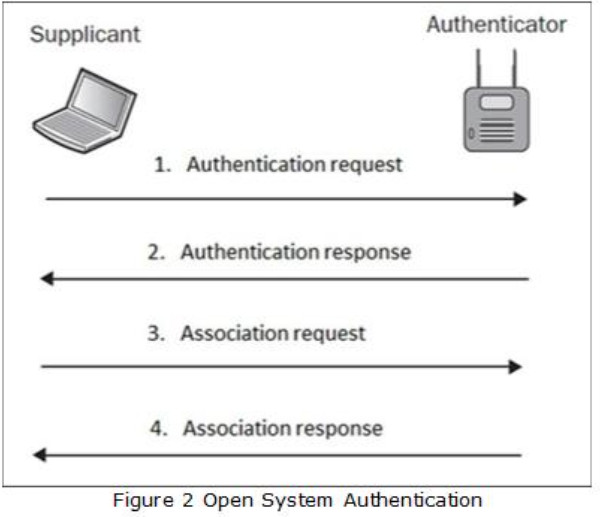
In Open System authentication, the Wireless Local Area Network (WLAN) client does not provide credentials to the access point during authentication. Despite it’s name, no authentication occurs with this method. However, once associated, encryption keys are used for encrypting the data in which the client must have the correct keys which still adds a layer of security.
Shared Key Authentication
In Shared Key Authentication, the system does require a shared key to authenticate to the access point. Unlike Open System authentication, the use of a pre-shared key provides a basic level of security. the WEP key is used in a four-step challenge-response handshake:
1) Authentication Request: Initially, like the Open System authentication method, the client sends the access point an authentication request.
2) Challenge: The access point responds with an authentication response which includes challenge text for the client.
3) Challenge Response: The client then responds with the encrypted challenge text, this is encrypted with the WEP key.
4) Verification: The AP then decrypts the challenge and responds with an indication of success or failure.
Wi-Fi Hacking Techniques
Packet Sniffing and Traffic Analysis
Packing sniffing involves capturing data packets that are transmitted over a wireless network. Hackers can use tools to intercept the communications and potentially gain access to sensitive information such as login credentials, emails, and personal data. It is always recommended to use encrypted secure communication channels to prevent the extraction of data sent over plain-text. You can use protocols like WPA3, enable HTTPs, or use VPNs if connected to public Wi-Fi to encrypt your traffic.
WPA/WPA2/WPA3 Cracking
By cracking the encryption keys, a threat actor can gain access to a password protected wireless network. If an attacker can capture a WPA handshake that occurs when a device attempts to connect to the access point, then they can be used to attempt to crack the key.
Attackers use dictionaries to do this; dictionaries are large text files containing common passwords or words that could be used for access point passwords. This allows them to use the previously captured handshake and special tools to brute-force the password.
To prevent an attacker from being able to exploit this, the use of strong, complex passwords, and enabling WPA3 where possible will make it sufficiently more difficult for an attacker to be able to exploit this.
Rogue Access Point (Evil Twin) Attacks
A Rogue Access Point, or commonly known as an Evil Twin attack, is where a threat actor sets up a malicious access point that would mimic that of a legitimate Wi-Fi network, such as the public Wi-Fi in a coffee shop. This then tricks the users into connecting into the malicious access point controlled by the threat actor rather than the legitimate one.
Once a user connects to the malicious access point, the attacker can start to intercept their data by performing an adversary-in-the-middle attack which could steal sensitive information.
WPA3 and the DragonBlood Vulnerabilities
When WPA3 was introduced in 2018, it was designed to be the solution to the security flaws that were rampant in WPA2 – specifically the offline dictionary attacks which were commonly used to crack passwords. With this, WPA3 introduced a new handshake protocol called Simultaneous Authentication of Equals (SAE) which is colloquially known as “Dragonfly”. This was designed to make password cracking mathematically infeasible.
What is DragonBlood?
In WPA2, a threat actor could capture a handshake that happens between your device and the router and then use that data offline to brute force the password until they found a match. WPA3’s Dragonfly handshake was designed to prevent this by requiring interaction with the router for every guess.
DragonBlood vulnerabilities are primarily side-channel attacks targeting the SAE handshake. Side-channel attacks are… The Dragonfly key exchange involves complex elliptic curve cryptography operations. However, researchers found that the execution time of these cryptographic operations depended on the password being used.
For instance, in a timing attack, by measuring the precise time it takes for an Access Point to respond to the authentication request, an attacker can infer information about the password. In a cache-based attack, attackers can monitor memory access patterns on the device to recover parts of the password. And finally, in a downgrade attack, a threat actor could force a client to connect to an access point using WPA2 to exploit the vulnerabilities previously mentioned.
The Effect on Business and Personal Infrastructure
Despite WPA3 being the gold standard of Wi-Fi security protocols, cyber security threats can still arise. Weak passwords can still be recovered if an attacker is able to perform a timing attack to leak information about your password, an attacker can still perform a denial of service against your infrastructure due to the computationally heavy WPA3 handshake, and certain individuals may be led into a false sense of security by using the WPA3 protocol.
It is important to remember that despite it being the most recent security protocol for Wi-Fi networks, it is still important to use strong passwords and implement strong procedures in your organisation or personal home.
DragonBlood Threat Prevention
The good news is that DragonBlood is largely a software implementation issue and not with the underlying protocol itself. This means that it can be easily fixed without the need of buying new hardware.
The main method to remediate and prevent the DragonBlood vulnerabilities are to ensure that Firmware updates are applied on all devices such as access points, routers, and client devices. Ensuring that the latest updates are applied means that you will be protected against old and common vulnerabilities.
Another method of prevention is to disable transitive mode where possible. If all of your devices support WPA3, disable the ability to allow WPA2 devices to connect to the access point. This prevents an attacker from forcing your device to downgrade from WPA3 to WPA2 and reintroduce the vulnerabilities found in the older WPA2 protocol.
Finally, ensure that you’re using strong, long, and complex passwords. Implementing a strong password policy in your organisation is an easy, quick, and effective way to prevent Cyber Security breaches.
Why WPA3 is Still the Gold Standard
Despite the DragonBlood vulnerabilities that were originally discovered in 2019, WPA3 still remains vastly superior to WPA2 and it is crucial not to revert to WPA2 out of fear of these issues.
Since discovery, WPA3 is incredibly robust and the vulnerabilities that were previously discovered have since been patched (WPA3.1 updates). WPA3 also enforces Protected Management Frames (PMF) which protect the network against common management attacks like de-authentication that was common in WPA and WPA2. Also, more importantly, that due to a feature known as forward secrecy, it is a lot harder for a threat actor to sniff your traffic even if they compromise the Wi-Fi password.
All in all, WPA3 still remains the best protocol for Wi-Fi security and it is strongly advised that you enforce this on all of your devices and access points where possible.
Wi-Fi Security Best Practices to Secure your Business Network
Wi-Fi security is crucial in a business environment and the security implications of not implementing the best practices are severe. Here are some essential Wi-Fi security best practices to help protect your business network from threat actors and unauthorised access:
- Enforce WPA3 where possible. Otherwise, opt for WPA2 with AES for strong protection.
- Disable WEP and WPA. These are outdated and vulnerable to multiple public vulnerabilities.
- Implement strong passwords that are long and complex with a mix of upper and lowercase letters, numbers, and symbols.
- Change default settings – do not use default administrative usernames and passwords for any network device that ships with them.
- Monitor for unauthorised devices. Regularly checking your network for any unauthorised or suspicious devices.
- Using a VPN for employees to connect to your corporate network, especially when working remotely, can help by encrypting their data if they’re using public Wi-Fi.
- Where possible, implement network access controls such as filtering authorised users to access your network via MAC address. Although this can be bypassed, it adds another layer of complexity which enhances security.
Wi-Fi Security Best Practices to Secure your Home Network
Wi-Fi security is crucial in a home environment too and the security implications of not implementing the best practices can lead your home network open to attacks without your knowledge. Here are some essential Wi-Fi security best practices to help protect your business network from threat actors and unauthorised access:
- Change default settings – do not use default administrative usernames and passwords for any network device that ships with them.
- Enforce WPA3 where possible. Otherwise, opt for WPA2 with AES for strong protection.
- Implement strong passwords for the Wi-Fi key and the Administrative login panel to your ISP provided router that are long and complex with a mix of upper and lowercase letters, numbers, and symbols – Most ISPs will ship your router with a strong password by default.
- Change the Default Service Set Identifier (SSID). An SSID is a unique name that identifies a particular wireless local area network. This is what you will see what you connect to a Wi-Fi network. The device’s default SSID typically identifies the manufacturer or the device, an attacker can use this to identify the device and exploit any of its known vulnerabilities.
- Disable Wi-Fi Protected Setup (WPS). WPS allows a wireless device to join a Wi-Fi network without the need to enter the wireless network password. However, the fact that WPS uses a PIN for authentication means that a threat actor can brute force this PIN. Many routers also lack a proper lockout policy to prevent multiple failed attempts.
Summary
WPA3 represents the current gold standard in Wi-Fi security, offering stronger encryption, protection against brute-force password guessing, and improved safeguards for data transmitted over wireless networks. Its use is strongly recommended wherever possible because it addresses many of the weaknesses found in earlier protocols, particularly WPA and WEP.
WEP is fundamentally broken and can be cracked within minutes using widely available tools, while WPA, though once an improvement, is now considered obsolete due to vulnerabilities in its authentication mechanisms.
WPA2 remains a viable option when WPA3 is not supported, as it still provides robust encryption through AES-CCMP, but it lacks the advanced protections introduced in WPA3, such as forward secrecy and resistance to offline dictionary attacks. In practice, organisations and individuals should prioritise WPA3 adoption to ensure resilience against modern threats, and fall back to WPA2 only when compatibility demands it, recognising that WEP and WPA no longer provide meaningful security in today’s environment.
References
- https://www.tutorialspoint.com/wireless_security/wireless_security_wifi_authentication_modes.htm
- https://academy.hackthebox.com/module/222/section/2399
- https://fullpdfword.org/look-up/mL8AA6/604239/4965447-hacking-techniques-in-wireless-networks
- https://www.cisa.gov/audiences/high-risk-communities/projectupskill/module5
- https://www.cisa.gov/news-events/news/securing-wireless-networks
- https://www.portnox.com/cybersecurity-101/wpa3/
- https://digital.nhs.uk/cyber-alerts/2019/cc-3024
- https://wpa3.mathyvanhoef.com/
- https://sgu.ac.id/wpa3-is-broken-your-next-gen-wifi-is-not-safe/