Introduction
What are polyglots? Polyglots in a security context; are files which can be interpreted as multiple valid file types. Polyglots are often used to bypass protection mechanisms such as antivirus or sanitation within form upload functions. Attackers manipulate the headers of these files to support multiple formats and insert hidden malicious code which can be executed under certain circumstances.
How do they work?
Many file formats such as a JPEGs, ZIP, PDF have dedicated fields for comments or metadata, which allows additional information to be stored without breaking the file structure. This can be abused by an attacker by storing additional information (such as a another file) within these segments to create a polyglot file. In order to ensure these work as intended, an attacker must first understand how each file type functions. An example of this is the JPEG file. A JPG image file only needs two components to function properly; a start of image (SOI) where the image begins and an end of image (EOI) where the image ends. Anything after the EOI is discarded and this is where a malicious actor can insert their own data such as a .zip file to create a polyglot file. Once inserted, a user can change the file to either a .jpg or .zip extension to change how the file is processed by the target functions.
What different types of polyglots exist?
While the main topic of this white paper is to discuss file type polyglots, other polyglots do exist such as command polyglots which I will cover briefly.
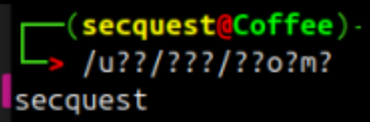
Command polyglots are commands which are highly obfuscated within the Linux operating system where the system executes a command based on a wildcard parameter. A wildcard in Linux tries to match a single character. An example of a command polyglot goes as follows: /u??/???/??o?m?. This random string of text looks like it will do nothing, as there’s only 3 letters, but the system resolves these into saying ‘whoami’ by using a term called ‘globbing’, this is where the system tries to match a character to another. For example: /u??/ will resolve to /usr/ as its 3 characters long and it begins with a ‘u’, secondly /???/ resolves to /bin/ as it’s the first 3 letter word in /usr/???, after this, /??o?m? Matches ‘whoami’ as there is only one file within this directory that has the characters o and m in their respective positions. If there was a file with the same length and letters in those exact positions, this command would run whatever comes first. The reason why an attacker may choose to use this type of polyglot is to bypass static analysis systems that check the content of files and text to detect malicious code.
Example
The system tries to match anything to /u??/ which matches to /usr/, afterwards ??? matches /bin/ due to it being the first 3 letter word inside of /usr/ and finally ??o?m?, because there is only one binary which has an o and m in the third and fifth place, the system prints out ‘whoami’ into the terminal, which then provides the output into the console!
Parser tolerance and file structure
JPEG+ZIP
To truly understand how polyglots work, I will discuss a common polyglot used by malicious actors; JPEG+ZIP is an image file (JPEG) which contains a .ZIP file inside of it. The opposite can be true where it’s a zip file with a hidden JPG image. JPEG’s are the easiest polyglots to work with, due to how JPEG file only requires two main components for our polyglot to function: a start of image (SOI) and end of image (EOI). A detailed diagram of what a JPEG structure looks like is shown below.
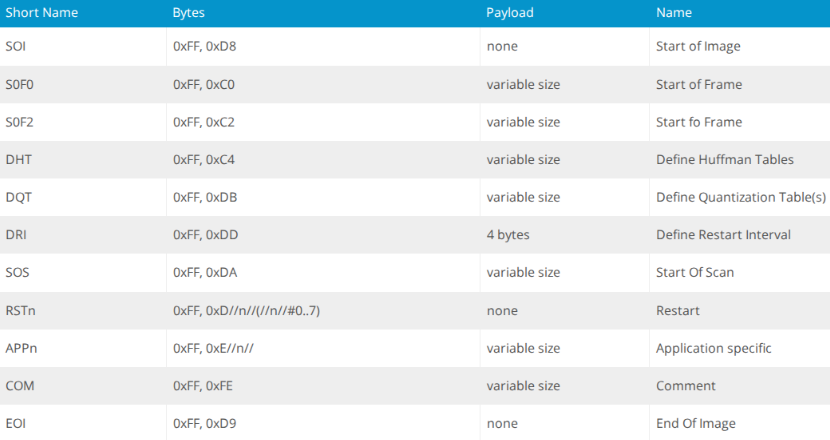
For this polyglot to work correctly, we must append our .ZIP file to the end of the JPEG where the EOI ends, this is because JPEGs only read up to the EOI, so anything after that is disregarded. Whereas the .ZIP parser skips to the end of the file to find the central directory. Below is a python script which creates a JPEG+ZIP polyglot.
import os
def create_jpg_zip_polyglot_clean(jpg_path, zip_path, output_path): with open(jpg_path, 'rb') as f: jpg_data = f.read()
with open(zip_path, 'rb') as f:
zip_data = f.read()
# Find the last occurrence of JPEG EOI marker (FF D9)
eoi_marker = b'\xff\xd9'
eoi_pos = jpg_data.rfind(eoi_marker)if eoi_pos == -1:
print("[!] Error: No JPEG EOI marker (FF D9) found!")
return False# Find EOI and then add two spaces after to ensure we don't corrupt anything
insert_pos = eoi_pos + 2print("[+] Found EOI marker at position: {:,}".format(eoi_pos))
print("[+] Inserting ZIP at position: {:,}".format(insert_pos))# Create polyglot
polyglot_data = jpg_data[:insert_pos] + zip_data# verify integrity
if polyglot_data[:insert_pos] != jpg_data[:insert_pos]:
print("[!] Error: JPEG data corrupted during processing!")
return Falsewith open(output_path, 'wb') as f:
f.write(polyglot_data)# Verify the polyglot starts with valid jpeg and contains a .zip
with open(output_path, 'rb') as f:
poly_data = f.read()jpeg_header = poly_data[:2]
zip_sig_present = b'PK' in poly_data[insert_pos:insert_pos+10]
eoi_preserved = poly_data[eoi_pos:eoi_pos+2] == eoi_markerprint("\n[+] JPEG header valid: {}".format(jpeg_header == b'\xff\xd8'))
print("[+] Contains ZIP signature: {}".format(zip_sig_present))
print("[+] EOI marker preserved: {}".format(eoi_preserved))
print("[+] Polyglot created: {}".format(output_path))return True
def analyze_jpeg_structure(jpg_path): """Analyze JPEG structure to find all EOI markers""" print("\n[+] Analyzing JPEG structure: {}".format(jpg_path)) with open(jpg_path, 'rb') as f: data = f.read()
# Find all EOI markers
eoi_positions = []
pos = 0
while pos < len(data):
pos = data.find(b'\xff\xd9', pos)
if pos == -1:
break
eoi_positions.append(pos)
pos += 2
print("[+] Found {} EOI marker(s)".format(len(eoi_positions)))
for i, pos in enumerate(eoi_positions):
print(" EOI #{}: position {:,}".format(i+1, pos))return eoi_positions
if name == "main": jpg_file = "image-file.jpg" zip_file = "storm.zip" output_file = "polyglot"
# First analyze the JPEG structure
eoi_markers = analyze_jpeg_structure(jpg_file)

# Then create the polyglot
print("\n[+] Using last EOI marker at position {:,}".format(eoi_markers[-1]))
create_jpg_zip_polyglot_clean(jpg_file, zip_file, output_file)
With this, we can create a JPEG+ZIP polyglot:
py .\script.py
[+] Analyzing JPEG structure: image-file.jpg [+] Found 1 EOI marker(s) EOI #1: position 177,934
[+] Using last EOI marker at position 177,934 [+] Found EOI marker at position: 177,934 [+] Inserting ZIP at position: 177,936
[+] JPEG header valid: True
[+] Contains ZIP signature: True
[+] EOI marker preserved: True
[+] Polyglot created: polyglot

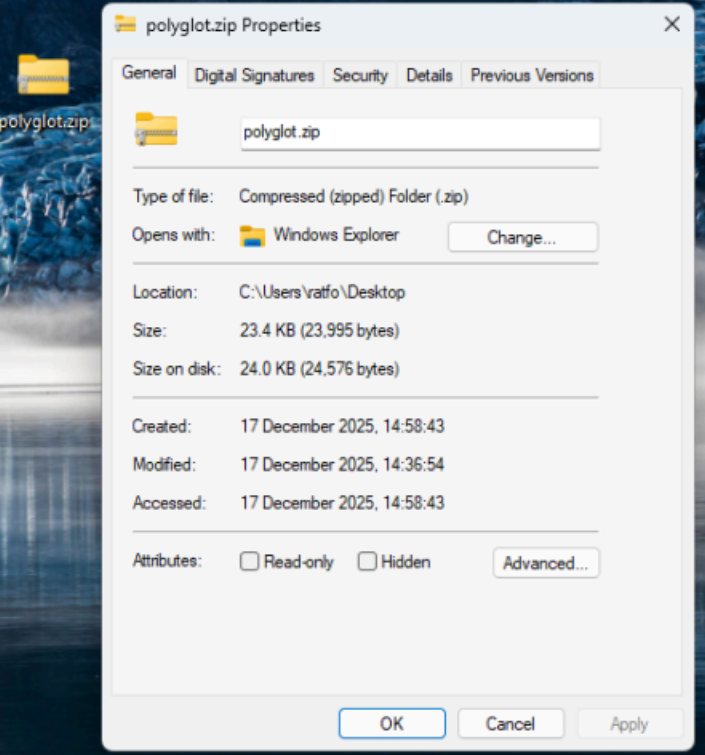
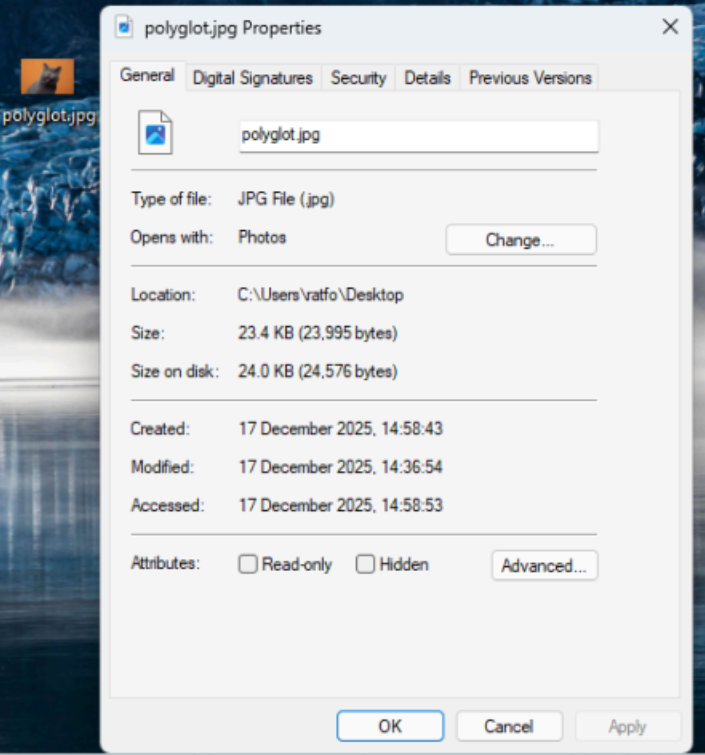
In this screen shot, the file ‘polyglot’ is our mischievous file, it is both a zip and jpg file. The other files in the directory are the files used by the python script. When used in a Windows, we can identify the two different extensions in one file.
Valid .zip polyglot
Valid .jpg/png polyglot
Real World Examples
Whilst my polyglot demonstrates the basics of creating a polyglot, malicious actors go a step further by including multiple steps which include obfuscation, encryption and C2 servers. One great example is the UNK_CraftyCamel APT group.
In October 2024, threat actors compromised an Indian electronic’s company email which was used to send a phishing email which contained a malicious ZIP archive. The archive contained three files, a masqueraded XLS file which was a LNK shortcut and two polyglot PDFs where one polyglot was a PDF/HTA and the other was PDF/ZIP. The LNK file executed cmd.exe which triggered mshta.exe to run the HTA script inside the polyglot PDF.
This script extracted and executed hyper-info.exe which retrieved a XOR-encrypted file (sosano.jpg) where after decryption would launch the final payload (sosanso.dll) which was loaded into memory. Once this process was completed, the attackers would have installed a backdoor into the victim’s computer.
Detection
Detecting polyglots can be very difficult as it requires deep packet inspection to filter out the good from the bad. A common way applications do this is by inspecting the header / data for additional pieces of information, for example, a JPEG only requires a SOI and a EOI, the rest of the image is not required, so if a JPEG contains additional information after the EOI, then this would raise alarms.
Protection
Polyglots require a lot of effort to detect, they can be highly obfuscated and masqueraded as multiple file types, it’s important to verify each file that is uploaded by a user to ensure there is no hidden content or any files hidden within it. There are multiple ways to detect a polyglot, for example; Analysing a file and removing anything that is not relevant to the file, in this scenario a JPEG only requires data between the SOI and EOI, everything after the EOI can be truncated. Additional measures include cleaning the meta data to remove any additional information as polyglots can use the description fields to hide additional payloads.
Summary
Polyglots are files crafted to be interpreted as multiple valid file types simultaneously, most commonly used by attackers to bypass security controls such as antivirus scanning and file upload filters. They exploit the structural tolerances of file formats, for example, a JPEG only processes data between its start and end markers, so malicious content like a ZIP archive can be appended after the end marker without corrupting the image. Beyond file-based polyglots, command polyglots can also obscure malicious terminal commands using Linux wildcard globbing to evade static analysis. Real-world threat actors, have weaponised polyglots in sophisticated multi-stage attacks combining phishing, obfuscation, encryption, and backdoor installation.
Defending against polyglots requires deep inspection of file content, stripping irrelevant data beyond expected boundaries, and cleaning metadata to eliminate hidden payloads.